Broker X-Ray · user manual
A free panel for MetaTrader 5 that reads your broker's live conditions — real spread, true cost per lot, swaps in money, execution and slippage — and shows how your broker ranks against the community. It never trades. It only reads and displays.
What it shows
Every broker charges differently, and the raw spread rarely tells the whole story. Broker X-Ray puts the numbers that actually matter in one clean, draggable panel with five tabs: your true cost per lot (spread plus commission), swaps normalized to money, leverage and margin, execution type, stop-out, ping, real execution slippage measured from your own fills, whether the broker suits robots, and a live community ranking of the cheapest brokers for your symbol.
It works on any symbol, any timeframe and any broker. Sharing is optional and always anonymous (see Privacy).
Installation and setup
1. Attach the panel
In MetaTrader 5, open the Navigator (Ctrl+N), find ForexInspector Broker X-Ray under Expert Advisors, and drag it onto any chart. The panel appears in the top-left corner. Drag it anywhere by its blue header.
2. (Optional) Turn on the community
The panel already shows everything about your own broker without any extra step. To also see the community ranking and the cheapest brokers, allow it to reach our server:
- Click Algo Trading in the toolbar so it is green.
- Open Tools → Options → Expert Advisors.
- Tick “Allow WebRequest for listed URL” and add https://forexinspector.com.
- Press OK, then remove and re-attach the panel.
This is per terminal: if you run several MT5 installs (one per broker), enable it in each one. Without it the panel still works fully for your own broker — you just won't see the community comparison.
The five tabs
At the top, the header shows the symbol, timeframe and ping, plus a Broker Score from 0 to 10 that is always visible. Below it, five tabs:
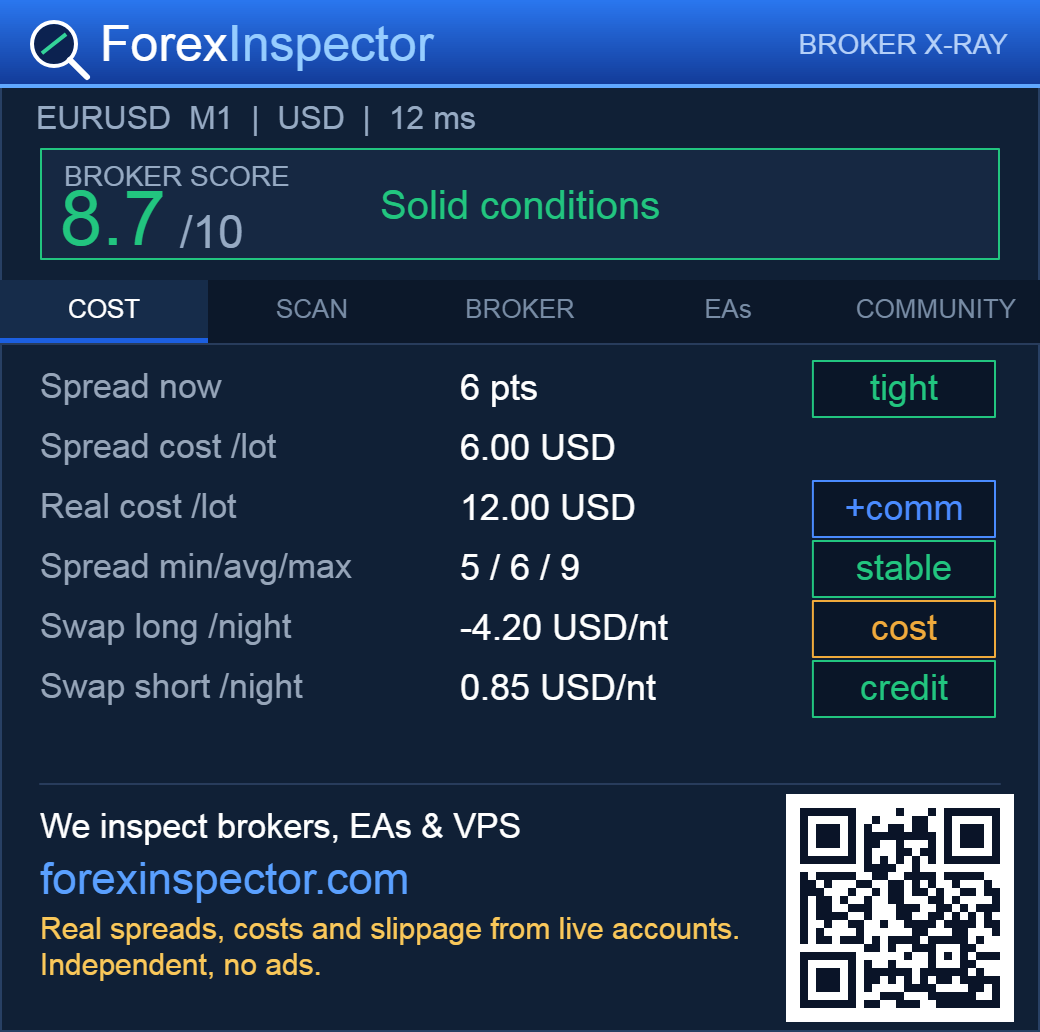
COST — what a round turn really costs
- Spread now — current spread in points, flagged tight / fair / wide against the daily range.
- Spread cost /lot — the current spread expressed in money, per 1.0 lot.
- Real cost /lot — the true round-turn cost: spread cost ×2 plus your commission. This is the number to compare between brokers.
- Spread min/avg/max — with a stability tag (stable / widens / unstable) so you can spot brokers whose spread blows out.
- Swap long / short /night — the overnight cost or credit, normalized to money in your account currency.
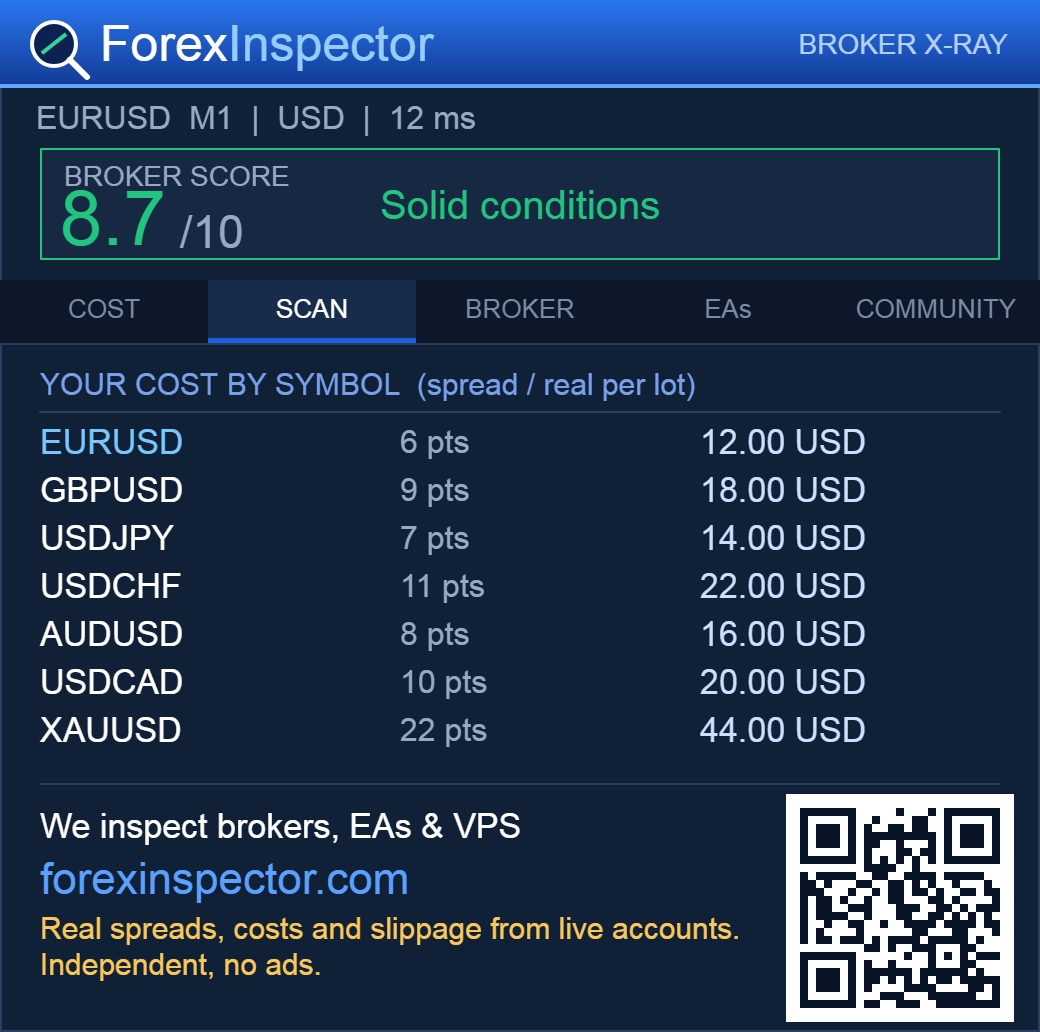
SCAN — your cost across symbols
- The spread and real cost per lot of your broker across the symbols you choose, at a glance.
- Pick the symbols in the Scan symbols input (comma-separated). They show up here so you can see where your broker is cheap and where it is expensive.
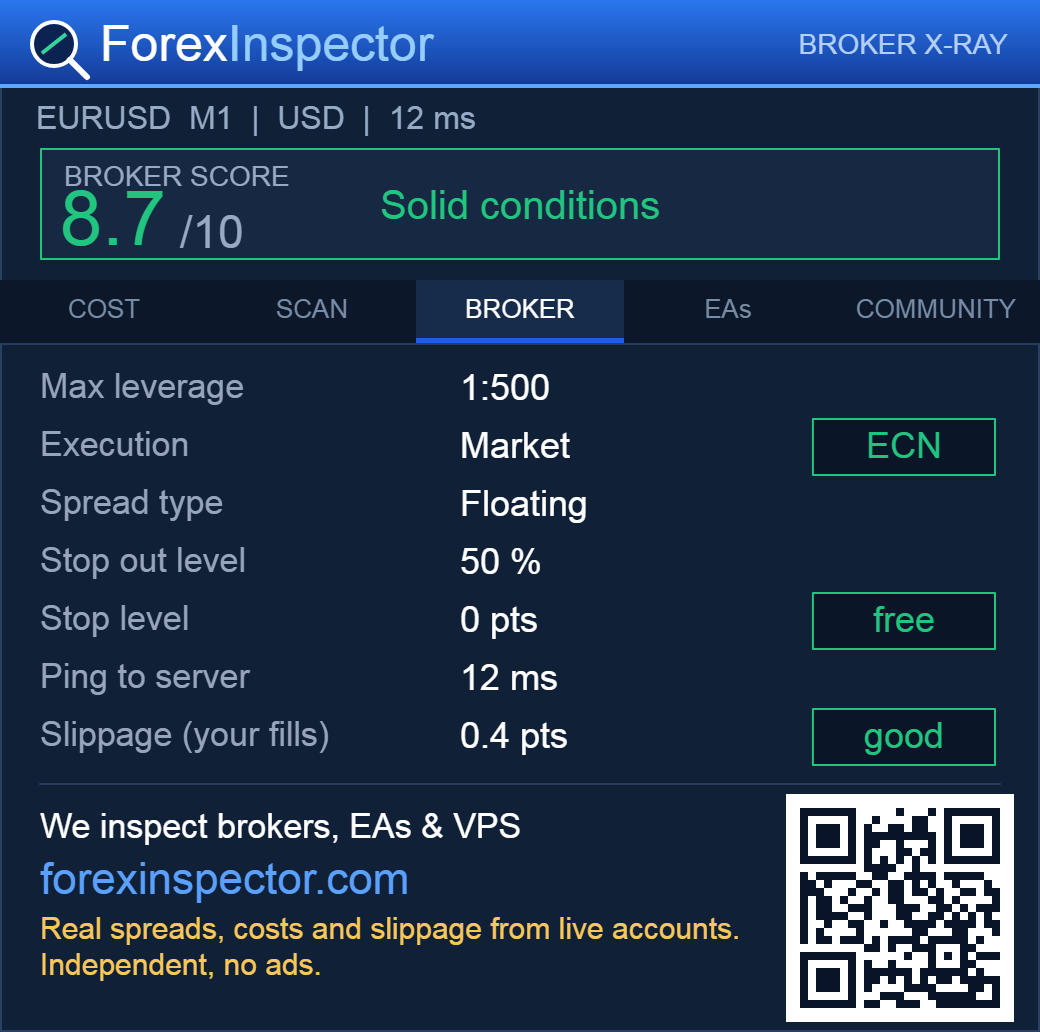
BROKER — the account and execution setup
- Max leverage, Execution (ECN / market vs dealing desk), Spread type (floating / fixed).
- Stop-out level and Stop level (how close to price you can place SL/TP).
- Ping to server in milliseconds.
- Slippage (your fills) — the real slippage measured from your own executed trades, in points. It fills in once you trade on that symbol.
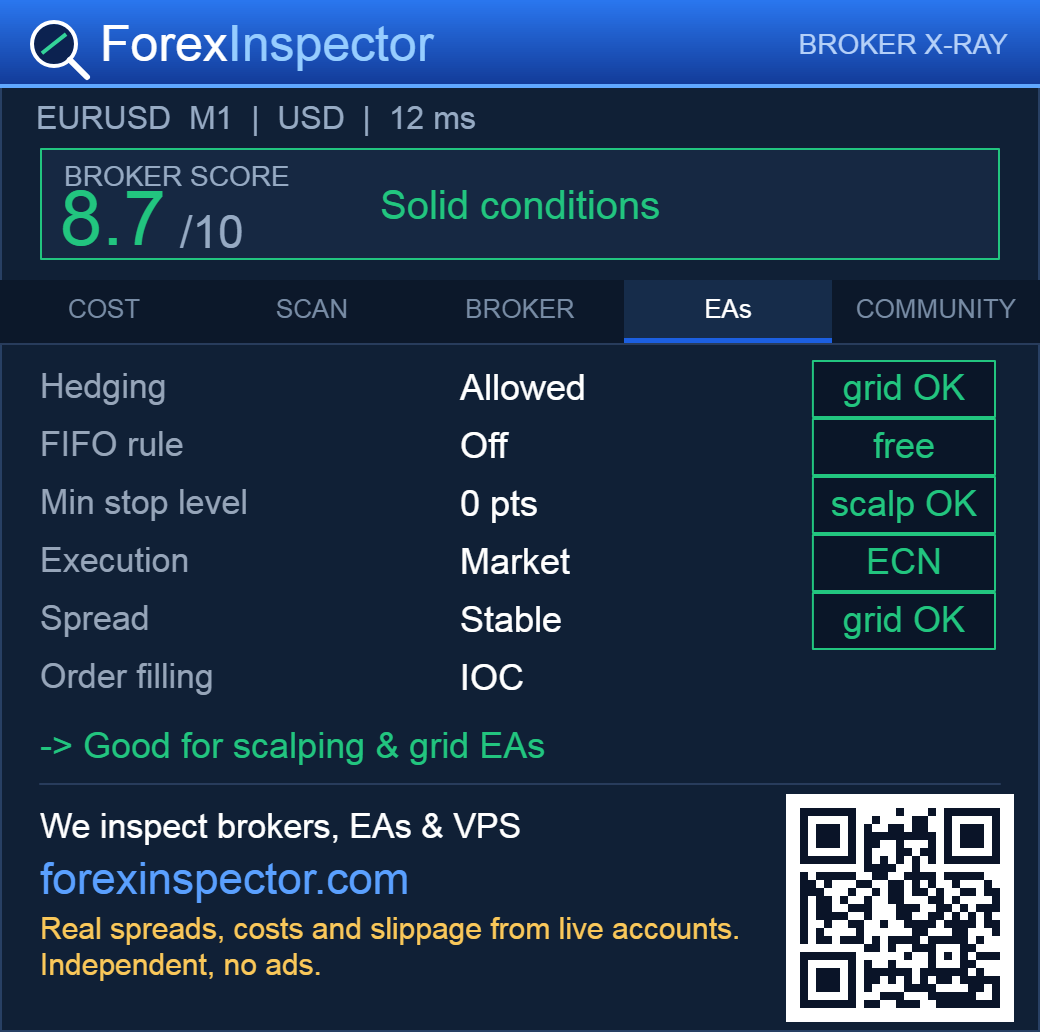
EAs — is your broker good for robots?
- Hedging (needed for grid/multi-position EAs), FIFO rule, Min stop level (matters for scalpers), Execution and spread stability.
- A clear verdict: good for scalping and grid EAs, good for grid/martingale, or better for swing/manual trading.
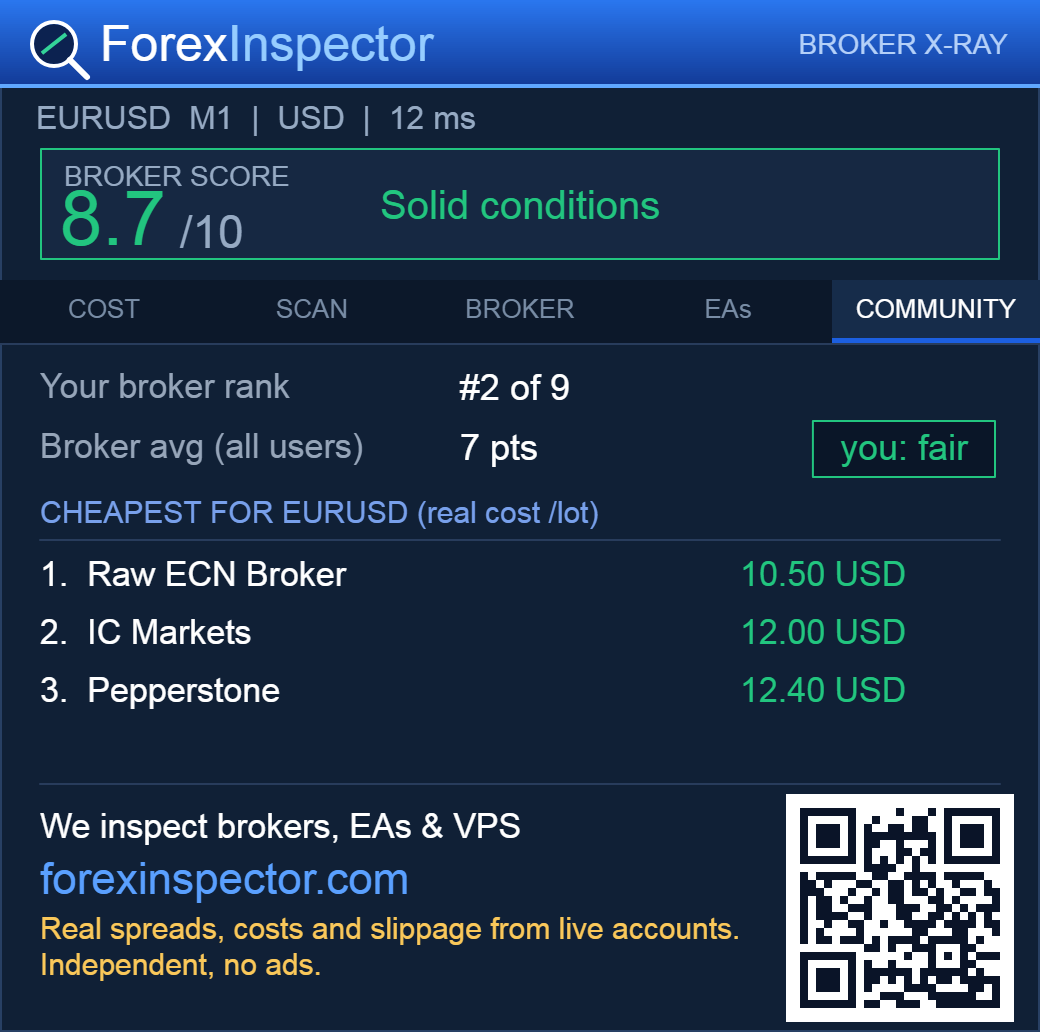
COMMUNITY — how your broker ranks
- Your broker rank for this symbol versus everyone sharing data, and the community average.
- Cheapest for this symbol — the top brokers by real cost per lot, crowdsourced live from real accounts.
- The full picture, for every symbol, lives at forexinspector.com/live.
The Broker Score (0–10)
A quick, honest read on the trading conditions of your broker for the current symbol. It is built from four facts the panel measures live:
- Spread vs volatility — the spread relative to the daily range (tighter is better).
- Spread stability — how much the spread widens over the session.
- Stop level — how freely you can place stops and targets.
- Swaps — how punishing the overnight cost is.
8–10 solid, 6–8 fair, 4–6 with reservations, below 4 watch the costs. The score changes with real conditions, so it is honest — a raw ECN broker on EURUSD scores differently from a wide-spread one.
Settings (inputs)
- Commission per lot, round turn — enter your broker's commission so the Real cost is exact. Raw/ECN accounts show a near-zero spread, the commission is the real cost.
- Scan symbols — the comma-separated list shown in the SCAN tab.
- Share anonymous broker stats — on/off. Feeds the community ranking (anonymous, see below).
- Show how your broker ranks — on/off. Fetches the community comparison.
- Panel scale / Font scale / X / Y — size and position of the panel.
Privacy
Sharing is optional. When it is on, the panel sends only anonymous broker statistics: broker name, server, symbol, spreads, costs, swaps, leverage, execution type, ping, and your average slippage in points.
It never sends your account number, balance, order history, or any personal data. It never places a trade. A random anonymous ID groups your own readings so the same broker isn't double-counted, nothing more.
How the community data works
Every panel that opts in contributes its broker's live numbers. The server groups them by broker and symbol and ranks them by real cost per lot (not the raw spread, which is misleading for ECN accounts). Your panel then shows your rank and the cheapest options.
The more traders use it, the sharper the picture. See the full, always-updating tables at /live (brokers) and /vps/live (VPS latency by provider).
FAQ and troubleshooting
The COMMUNITY tab says “building” or “you are early”
There isn't enough shared data for your symbol yet. It fills in as more traders join — be one of the first.
Slippage says “no fills yet”
Slippage is measured from your own trades. Once you execute orders on that chart's symbol, it starts showing your real average slippage.
The spread shows 0 points on EURUSD
That's normal on raw/ECN accounts — the spread is tiny and the real cost is the commission. Enter your commission in the inputs to see the true cost.
The community won't load
Make sure Algo Trading is on and https://forexinspector.com is added under Tools → Options → Expert Advisors, in that terminal. Each MT5 install needs it separately.
Does it work on MT4?
Currently MetaTrader 5 only.
Does it trade or slow my terminal?
No. It never sends an order and only reads and draws a panel. It is safe to run alongside your EAs on other charts.
Tips
- Set your commission per lot for an accurate real cost — it's the single most useful setting.
- Add the pairs you trade to Market Watch and to the Scan symbols input to compare them side by side.
- Run it on one chart per broker to compare your accounts on the same symbol.
- Drag the panel by its header; tune size with Panel scale and Font scale.
Part of ForexInspector — independent reviews of brokers, EAs and VPS with real data.